01
Familiar by design
Spreads and parent pages, frames and threaded stories, the Control panel, swatches, text wrap — the InDesign layout, tools, panels and shortcuts, rebuilt clean-room in Rust.
01 / DesignCraft Page layout · Early alpha
01 DesignCraft
Spreads and parent pages, threaded text frames, paragraph and character styles, text wrap and a real paragraph composer — a free, open-source InDesign alternative written entirely in Rust and compiled to WebAssembly. It imports and writes IDML, exports PDF/X and EPUB, needs no account, never uploads your documents, and works offline. Open the DesignCraft editor — free and open source.
Runs in your browser — free and open source
02 / Highlights
01
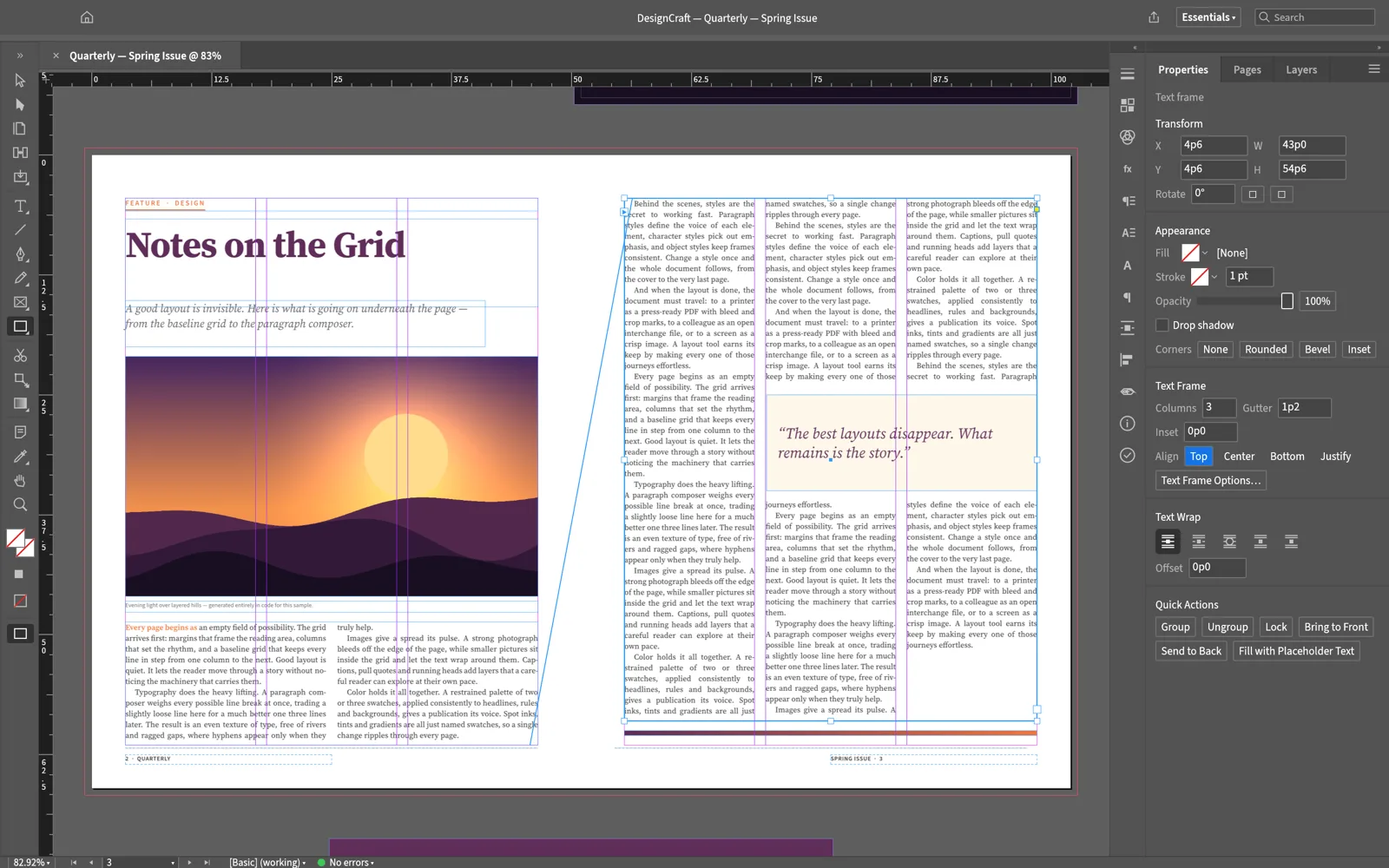
Spreads and parent pages, frames and threaded stories, the Control panel, swatches, text wrap — the InDesign layout, tools, panels and shortcuts, rebuilt clean-room in Rust.
02
A Knuth–Plass paragraph composer, dictionary hyphenation, word/letter/glyph-scaling justification, keeps, optical margin alignment, baseline grid and columns — identical line breaks on screen and in PDF.
03
A documented native format, IDML import and export, PNG and PDF proofing, PDF/X-4 and PDF/A-2b export, and EPUB — no subscription, no licence server, no telemetry.
04
Multithreaded SIMD rendering, copy-on-write documents with O(1) undo snapshots, and cached composition — a Rust engine, not a port of a desktop app.
05
Every menu item, tool gesture, panel control and dialog is drivable over a JSON control channel and an MCP server — agents can lay out documents like a designer.
06
One Rust codebase for desktop and the web; your files stay on your device in the browser build, cached for offline work.
03 / Made for
01
Thread body text across columns and pages, wrap it around figures, keep headlines with their leads, and flow it all from one story file.
02
Parent pages for running headers and folios, styles for consistency, baseline grid for polish — then export a press-ready PDF/X-4.
03
Bring text in, structure it with styles, and export reflowable EPUB straight from the layout — one tool from manuscript to published.
04 / Typography
Most tools break lines one line at a time. DesignCraft’s Knuth–Plass composer optimizes the whole paragraph — hyphenation from public dictionaries and trained patterns, justification tuned by word, letter and glyph scaling, keeps that hold headings to their following line, optical margin alignment that hangs punctuation into the margin, and a baseline grid columns snap to.
05 / Screenshots
06 / Get DesignCraft
The full layout engine, compiled to WebAssembly — no download, no installer, no account. It boots like a web page and lays out like a native app.
Launch the editorInstall it as an app from your browser and DesignCraft keeps working without a connection — the shell, the engine and your last document are cached on your device.
Layouts open from and save back to your device as IDML or DesignCraft’s documented native format. Nothing is uploaded — there is no server to upload to.
07 / FAQ
Yes. DesignCraft is free and open source under MIT OR Apache-2.0 — no subscription, no licence server, no telemetry. The web app needs no account.
It imports and exports IDML, the open interchange format InDesign itself uses; layouts round-trip through IDML rather than the proprietary .indd.
Yes — PDF including the PDF/X-4 and PDF/A-2b standards, plus EPUB, and PNG for proofs; all written by DesignCraft’s own Rust code.
Yes. Install DesignCraft as an app from your browser and the shell, the engine and your last document are cached on your device; editing continues without a connection.
A Knuth–Plass paragraph composer (plus single-line), dictionary hyphenation, word/letter/glyph-scaling justification, keeps, optical margin alignment, baseline grid and columns — and line breaks are identical on screen and in the exported PDF.
No. The editor runs in the tab; documents open from and save back to your device. There is no server to upload to.
08 / The family
DesignCraft is one of a family of open crafting tools.
Spreads, styles and a real composer — in a tab, for free.
Start laying out